


Care.com: Find Caregiver Jobs
4.66.37K Reviews
App Specs
- Version
- 25.53
- Updated On
- License
- Free
- Downloads
- 1,000,000+
- Developer
- Care.com Inc
- Categories
- Lifestyle
- Platform
- Android, iOS
Screenshots
 Analysis by AppCompare
Care work often begins with a practical question: where can I find opportunities that fit my skills, schedule, and comfort level? Care.com: Find Caregiver Jobs is built around that search, bringing household-care roles together in one place. I see its main value as a way to explore possibilities and start conversations, rather than a promise that every listing will suit you or lead to a hire.
A shared device needs clear account boundaries
In a household where a phone or tablet is shared, I would treat this as a personal job-search account, not a family noticeboard. A caregiver profile represents the person seeking work, so it should be written and managed by that person. Before signing in on a shared device, consider who can see messages, profile details, and notifications, and sign out when you are finished if other people use the same device.
This distinction matters when several adults help someone search. One person can offer feedback on a profile or help compare job details, but the applicant should stay in control of what is shared and what gets sent. That keeps the conversation with a prospective household direct and avoids confusion about who is applying or responding.
Finding a realistic fit, not just a nearby listing
A useful way to search is to decide your boundaries before browsing: the kinds of care you are comfortable providing, the travel distance you can manage, and the hours that genuinely work around your other commitments. Then use the available filters to narrow the results and read each post carefully. A close match on location is only a starting point; duties, timing, and expectations matter just as much.
For example, if you are considering a role that combines household tasks with care, pause to check how the post describes those responsibilities. If the details leave you unsure, ask a specific question before arranging an interview. I would also keep a brief note of what matters to me in each listing, such as schedule or type of care, so several open applications do not blur together.
Trust takes more than a profile
Care work involves real responsibility, so I would use an app listing as an introduction rather than as a substitute for judgement. Read the post, talk through the duties, and make sure expectations are clear before agreeing to anything. The app’s focus on profiles and direct communication can help start that process, but a polished profile or a convenient match does not by itself establish whether a role is right for you.
Care.com is a lifestyle app from Care.com Inc. It is free to download, carries an Everyone age rating, and has an average rating of 4.6 from around 15,000 ratings, with more than 6,000 written reviews. Those figures may help frame its reach, but they are not a guarantee that you will find suitable work in your area. I would judge it by the quality and relevance of the listings available to me.
Worth Reading Before You Choose

EA SPORTS FC Mobile 26 Is a Bigger Football Game, but It Takes Time

Flipboard Shows What News Apps Must Do Beyond the Feed

Switching to Android Auto Means Rethinking Your Driving Routine

Google Calendar Makes a Crowded Week Easier to Manage

Ludo King Makes the Most of the Minutes Between Plans

Baby Panda World Brings Quick Play to Modern Phones, but Its Game Library Feels Busy
Getting Started with the App
First things first, downloading Care.com: Find Caregiver Jobs is a breeze. It's available for both Android and iOS, so whether you’re an Apple enthusiast or an Android aficionado, you’re covered. After a quick download, you’re ready to dive in.
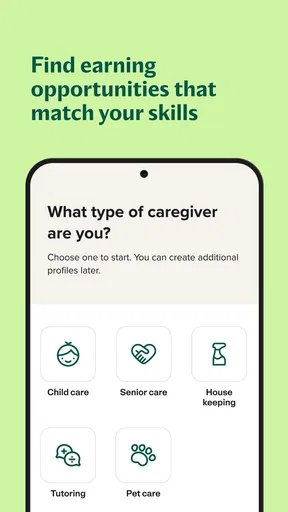
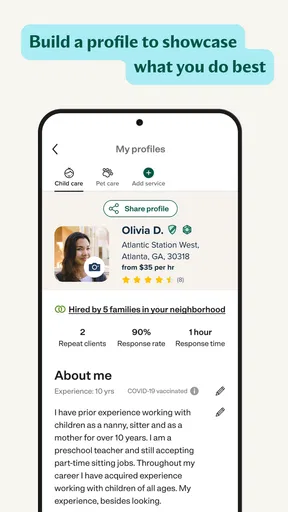
The sign-up process is straightforward. You’ll need to create a profile, which is where you’ll highlight your skills, experience, and any certifications you might have. Think of it like putting together a mini-resume. The app guides you through each step, and before you know it, your profile is up and running.
Exploring Job Opportunities
Once your profile is set, it’s time to start the job hunt. This app is teeming with opportunities for caregivers of all kinds. Whether you're into babysitting, pet care, senior care, or tutoring, there’s something here for everyone.
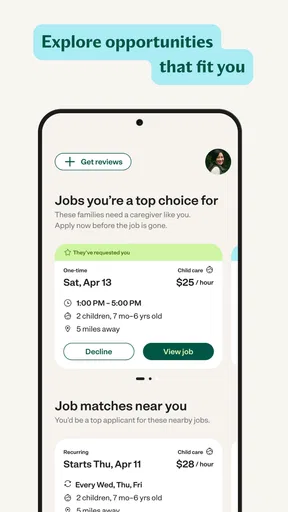
The job search feature is pretty nifty. You can filter jobs by location, pay rate, and job type. If you're looking for something local, the map view is incredibly helpful. I found it super convenient to see potential jobs plotted out geographically.
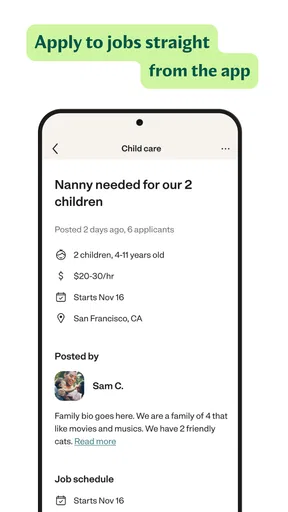
Scrolling through the job listings, you’ll find that each post is quite detailed. Employers provide information about the hours, expected duties, and sometimes a little bit about their family dynamics. It’s like getting a sneak peek before you even apply.
Applying and Communication
Applying for jobs is as simple as hitting the “Apply” button. The app lets you customize your application message, which is a nice touch to make your application stand out. Once you've applied, you can track your applications and see when they’ve been viewed.
Communication is a key feature here. The app allows you to message potential employers directly, which makes coordinating interviews and discussing job specifics much smoother. The in-app messaging keeps everything organized, so you won’t miss a beat.
Extra Features Worth Mentioning
Beyond job searching, the app has a few additional features that are worth mentioning. There’s a section for reviews and ratings, where past employers can leave feedback about their experience with you. It’s like having testimonials right at your fingertips.
The app also offers resources and articles aimed at improving your caregiving skills. Whether it’s tips on handling difficult situations or advice on managing your schedule, these resources can be incredibly helpful for both newbies and seasoned pros.
Safety and Support
Safety is a big concern in the caregiving world, and Care.com doesn’t skimp on providing a secure platform. They offer background check services, which is a huge plus for building trust with potential employers. It’s optional, but having it can definitely give you an edge.
If you ever run into issues, the app has a solid support system. Whether it’s technical difficulties or questions about your account, customer support is just a tap away. They’ve got a helpful FAQ section too, which can quickly resolve common questions.
Make applications easier to manage
When several roles look promising, I would avoid sending the same generic note to every household. Use the listing to mention the care type and schedule you are responding to, then ask one useful question if a key detail is unclear. That makes the first exchange more focused and helps you decide whether an interview is worth arranging.
Application tracking is especially handy when you are searching around other work or family responsibilities. I’d check it at a planned time rather than repeatedly opening the app, and keep a separate reminder for any follow-up you intend to send. Being able to see that a message was viewed is useful context, but it should not be treated as a response or a commitment from the employer.
What the app can and cannot replace
Compared with asking friends for referrals or checking general local listings, Care.com brings several kinds of household-care work into a single search and lets you filter by job type and location. That can save time when you are open to different roles. A personal referral may still be better if you want a recommendation from someone you already trust, while a general job board may make more sense for work outside childcare, senior care, pet care, or housekeeping.
The trade-off is that a broad marketplace can include posts that are not a good fit, even after filtering. You still need to assess the duties, hours, commute, and communication style yourself. If your search is narrowly specialized or you only want work through a known local organization, this app may be a supplement rather than your main route.
Everyday coordination and realistic expectations
Imagine you have a few free mornings each week and are looking for nearby pet-care work. You could filter for that type of role, use the map to judge whether the location is practical, and compare the expected hours in each post before applying. If an employer replies, use the conversation to clarify the routine and responsibilities rather than assuming the listing covers every detail. This is where the app’s combination of search, applications, and messaging feels most useful: it helps move from browsing to a concrete discussion.
For shared household planning, a simple routine can prevent crossed wires: the applicant reviews listings, a trusted person gives feedback if invited, and only the applicant sends messages or agrees to next steps. I would not assume the app provides family accounts or shared controls. Keeping the process organized outside the app, with a private note of listings and interview times, is a practical way to coordinate without handing over account access.
Who should take a closer look
I’d recommend trying it if you are actively looking for household-care work and want one place to browse childcare, senior care, pet care, and housekeeping opportunities. It can also suit someone testing a new care category, provided they read role requirements closely and describe their relevant experience honestly. The app is less compelling if you already have a reliable referral network, need a job unrelated to home care, or do not want to build and maintain an online profile.
It is also worth approaching the search with patience. A large audience does not mean every neighborhood or specialty will have a steady stream of suitable posts. If results feel thin, adjust your search thoughtfully, check back later, or use another channel alongside the app rather than widening your availability beyond what is genuinely workable.
Version, age context, and a sensible verdict
The current version is 25.43.1, and the app requires Android 8.0 or later. It has been available since May 31, 2018, and has more than a million installs. I’d see that reach as a sign that it is an established option, while remembering that the usefulness of a job-search app still depends on the opportunities and conversations available to each person.
An Everyone rating describes the app’s age classification, not a recommendation that children manage a caregiver job search. Because profiles and employer conversations concern work and personal details, I would keep the account with the adult applicant and avoid treating a shared family device as shared account access. That is a straightforward boundary for a household to agree on before anyone starts browsing together.
Overall, Care.com: Find Caregiver Jobs is a comprehensive tool for anyone in the caregiving field. The user-friendly interface, combined with a plethora of job opportunities and supportive features, makes it a standout in the app world. If you’re serious about finding caregiving jobs, this app is definitely worth checking out.
Pros
- User-friendly interface simplifies job search.
- Wide variety of caregiving opportunities.
- Robust profile customization for caregivers.
- Real-time notifications for job updates.
- Secure messaging with potential employers.
Cons
- Premium features require a subscription.
- Limited international job listings.
- Occasional app performance lags.
- Profile approval can take time.
- In-app ads may be distracting.
FAQs for Care.com: Find Caregiver Jobs
What types of jobs are available on Care.com?
Care.com offers a wide range of caregiving jobs, including positions for babysitters, nannies, pet sitters, senior caregivers, tutors, and housekeepers. Users can browse listings based on their skills and availability, making it easy to find the perfect fit for their expertise. The app regularly updates with new job opportunities, ensuring a consistent flow of options.
How can I apply for jobs on Care.com?
To apply for jobs on Care.com, users must first create a profile that highlights their skills, experience, and availability. Once the profile is set up, users can search for jobs and apply directly through the app. It's essential to tailor applications to each job by including relevant experience and a personalized message to potential employers.
Is there a cost associated with using Care.com?
While creating a basic profile and searching for jobs on Care.com is free, the platform offers a premium membership for additional features. Premium members can access enhanced tools such as background checks, direct messaging with employers, and higher visibility in search results. Users can choose between monthly and annual subscription plans.
How does Care.com ensure the safety and security of its users?
Care.com implements several safety measures to protect its users. These include identity verification, background checks for caregivers, and secure messaging within the app. Users can also read reviews and ratings from previous employers to make informed decisions. The platform encourages safe practices, such as meeting in public places for initial interviews.
Can I manage my schedule through Care.com?
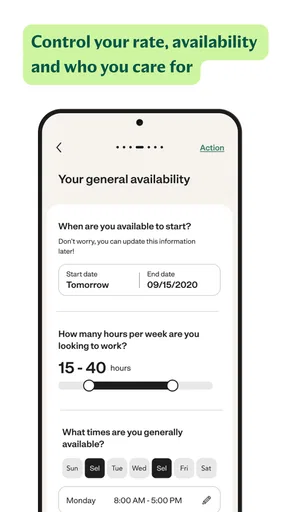
Yes, Care.com provides tools for users to manage their schedules efficiently. Caregivers can update their availability directly in the app, allowing employers to see when they are free for work. This feature helps avoid scheduling conflicts and ensures clear communication between caregivers and families seeking care.


